
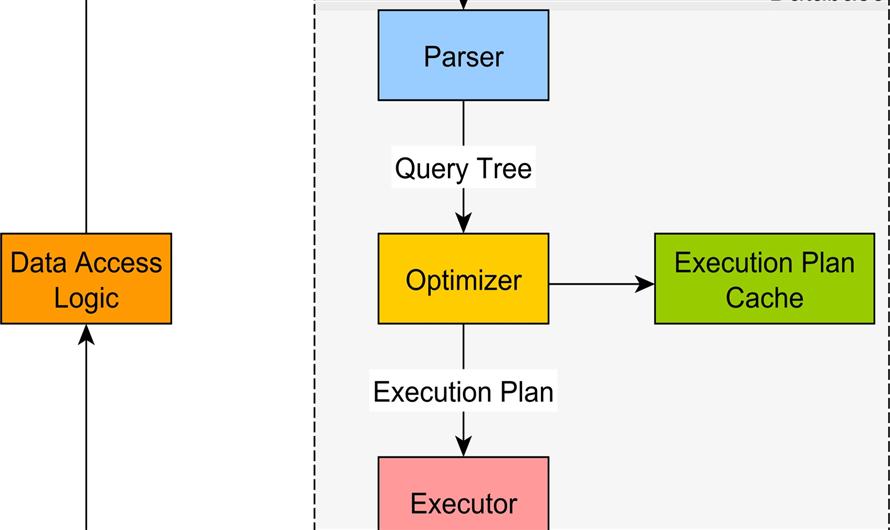
When we write a query in SQL Server, we usually think that the database will execute the query exactly as we write it.
But in reality, the database engine first creates a SQL Execution Plan and then runs the query based on that plan.
Understanding the execution plan is very important for developers, especially when working with performance issues.
This blog explains Execution Plan in simple language.

1. What is SQL Execution Plan?
An SQL Execution Plan is a step-by-step process created by the database engine to execute a query in the fastest way.
It tells:
- Which table will be read first
- Which index will be used
- How join will happen
- How data will be filtered
- How result will be returned
In simple words:
Execution Plan = How SQL Server decides to run your query
Execution plan is created by the Query Optimizer.
2. Why SQL Execution Plan is Needed?
Suppose you write:
SELECT * FROM Users WHERE Id = 10SQL Server has many ways to get data:
- Scan full table
- Use index
- Use seek
- Use cached result
- Execution plan helps SQL Server choose the fastest method.
Without execution plan, queries will be slow.
3. Types of Execution Plan in SQL Server
1. Estimated Execution Plan
Shows what SQL Server thinks will happen.
Shortcut in SQL Server:
Ctrl + LUsed when:
- Query not executed yet
- Want to check performance before run
2. Actual Execution Plan
Shows what actually happened when query executed.
Shortcut:
Ctrl + M- Then run query.
- This is more accurate.
4. Example of Execution Plan
Query:
SELECT * FROM Orders OJOIN Customers C ON O.CustomerId = C.IdWHERE O.Id = 5Execution plan may show:
- Index Seek on Orders
- Nested Loop Join
- Index Seek on Customers
- This means SQL Server is using index, which is good.
5. Important Terms in Execution Plan
Table Scan
- SQL reads full table.
- Bad for performance.
Index Seek
- SQL uses index to find row.
- Good for performance.
Index Scan
- Reads index but not efficient.
- Medium performance.
Nested Loop
- Used in join.
- Good for small data.
Hash Join
- Used for large data.
Sort
- Sorting data.
- May slow query.
6. How to Open Execution Plan in SQL Server
In SQL Server Management Studio
Steps:
- Open query window
- Click
Include Actual Execution Planor press
Ctrl + M- Run query
- Execution plan tab will open.
7. Why Execution Plan Important for Developers
Execution plan helps to:
- Fix slow queries
- Optimize joins
- Add indexes correctly
- Improve API performance
- Improve stored procedure speed
For interview, this is very important topic.
8. Common Performance Problems Found in Execution Plan
| Problem | Reason |
|---|---|
| Table Scan | Missing index |
| High cost | Bad query |
| Key Lookup | Need covering index |
| Sort warning | No index |
| Hash Match heavy | Large data |


Leave Comment